
The September release record
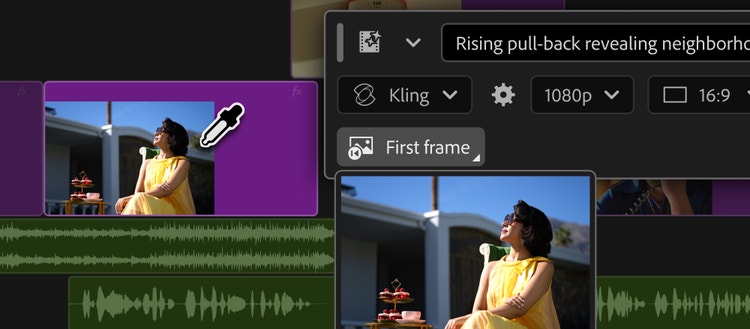
On 8 September 2026, Adobe announced a Generative Media Tool for Premiere that it said could generate editable video and audio clips directly in a project. Adobe described Generate Video as filling timeline gaps using reference frames sampled from the project to better match surrounding visual context. The same announcement described Generate Sound Effects, Generate Soundscape in beta and Generate Music in beta, and said creators could select Adobe Firefly or named partner models including Google Veo, Kling, Runway and Luma. Adobe presented Generate Soundscape as a starting point that creators could refine. It said Soundscape could analyse up to 15 seconds of video to sketch timed ambience and effects. These are Adobe’s descriptions of its announced tools and models, not an independent claim that a generated insert will match a production or clear its inputs for release.
Editorial workflow synthesis: write the missing beat first
Before filling a gap, write a one-line edit note: what the audience must understand before the next cut, what must remain unchanged, and how the new material enters and leaves the scene. Add the two adjacent reference frames, the required action, camera relationship, lighting and sound role. This reframes a request from “make b-roll” to a bounded editorial task. It also gives the editor a way to reject a technically smooth result that introduces the wrong geography, emotional emphasis or story information.
Keep generated media reversible
Place a generated candidate on its own labelled track or version, leaving the gap and original media intact. Review it at normal speed in the full sequence, then inspect the joins frame by frame for direction, grain, reflected detail and action continuity. For sound, check whether the new effect or ambience identifies the same space and time as the image; mute it once to ensure it is not masking an edit problem. Record the selected model, reference frames, prompt, generation date and reason for selection in the project notes. Include the approving role and the delivery version so the insert can be traced after turnovers or versioning changes. Add a simple rollback instruction identifying the prior cut and source take, so a delivery change can be reversed without reconstructing the edit from memory. The goal is an accountable insert, not an untraceable repair.
Sources & limits
- Adobe · Generate and create directly in your timeline with new AI-powered innovations in Premiere and After Effects · 8 Sept 2026
Adobe’s announcement date; Generative Media Tool description; reference-frame use in Generate Video; described audio tools and beta status; stated model choices; and Adobe’s stated editable-output positioning. Checked 19 Sept 2026.
Factual reporting is limited to Adobe’s first-party announcement. The labelled workflow synthesis is Screen Method editorial guidance; it does not claim hands-on testing, independent matching performance, model availability in any plan or region, rights clearance, pricing verification or production savings.
Event: 8 Sept 2026. Source publication: 8 Sept 2026. Prepared and checked 19 Sept 2026 for this local review; not publicly published by this edition. This is a dated article, not a live status or monitoring service.